Getting amazing GoPro shots is all about knowing a few tricks. Here are some friendly tips to help you capture that stunning footage you’ve dreamed about.
First off, play with the different modes. GoPros come with various settings like TimeWarp and Burst mode. TimeWarp is perfect for capturing smooth time-lapse videos while you're on the move. If you're into action shots, Burst mode snaps multiple frames in a split second. This way, you won’t miss the perfect moment!
Lighting is crucial. Natural light makes a huge difference, so try to shoot early in the morning or during golden hour in the evening. If you’re shooting indoors or in the shade, consider bringing extra lighting or bumping up the ISO.
Don’t forget about your angles! Experiment with low-angle shots for a dynamic effect or use a higher perspective to capture the whole scene. A simple tilt or rotation can change everything. Remember to keep your camera steady; you can invest in a tripod or a gimbal for smoother shots.
Finally, keep it clean. Make sure your lenses are free of dirt and smudges for crystal clear shots. A quick wipe before you start shooting makes a world of difference. Now, grab that GoPro and get out there!
Settings for Stunning Action Photos
Want to capture action photos that look like they belong in a magazine? Setting up your GoPro the right way can make all the difference. Here are some simple tweaks to get the best shots.
First things first, understand your resolution and frame rate. For stunning photos, set your GoPro to the highest resolution possible. If you're shooting fast-moving scenes, consider a frame rate of 60 frames per second or higher. This way, you get crisp, clear images even when the action is intense.
Next up, try using the burst mode. This feature snaps multiple shots in quick succession, which is perfect for catching that perfect moment during a jump or a wave. Just hold down the shutter button, and your GoPro will take care of the rest. You'll sort through a lot of pics, but trust me, it’s worth it when you find that one perfect shot.
Don't forget about your field of view (FOV). Go for Wide mode if you want to capture the whole scene, or switch to Linear for a more classic look. Depending on your action, adjusting this can either add to the drama or keep things looking more “normal.” Experiment and see what fits your style best!
Finally, don’t rely solely on automatic settings. Dive into the manual controls for exposure and ISO. Lower ISO settings are best for bright days, while higher values work well in low light. These small changes can drastically improve the quality of your photos, making them pop with vibrant colors and details.
Creative Angles to Explore
Getting the right angle can change everything in GoPro photography. It’s not just about slapping your camera on a mount and hoping for the best. Let’s dive into some creative angles that’ll make your shots stand out.
First up, think about low angles. Shooting from down low can give your photos a dramatic flair. Capture a mountain biker speeding past with the ground surface in focus. This can create a thrilling sense of speed and adventure. Plus, it highlights the environment in a way that's just plain cool.
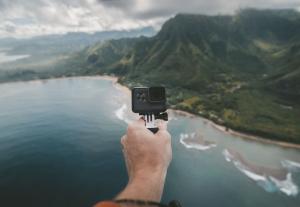
Don’t forget the bird’s eye view! Use a selfie stick or drone to get above the action. This angle gives a fresh perspective, especially during group activities like a beach volleyball game or hiking trails. Your viewers will feel like they’re flying over the scene, making those memories even more special.
Looking for something a bit different? Try including reflections in your shots. A calm lake or a shiny surface can add an interesting layer to your photos. Position your GoPro so it captures both the subject and what’s mirrored below. It’s a fun way to play with depth and symmetry.
Finally, consider side angles. Instead of shooting your subject head-on, pick a side view. This change can showcase movement and give context to the action. Think about a surfer riding a wave, where you see the wave’s curve and the board slicing through the water. It’s all about making the viewer feel part of the action.
Editing Tricks for Amazing Results
Editing your GoPro footage can turn your adventurous videos into stunning masterpieces. Here are some fun tricks to help you get amazing results.
First up, use color correction. GoPro captures vivid colors, but sometimes you want to add a little extra pop. Software like Adobe Premiere Pro or GoPro's own Quik app can help you adjust brightness and contrast. Just a few tweaks can make your sky bluer and your landscapes more vibrant.
Next, don't underestimate the power of slow motion. If you’ve shot any intense action, slowing it down can really emphasize the thrill. You can go through your footage and pick moments that deserve the spotlight. Just remember to shoot at a higher frame rate to keep everything smooth when you slow it down.
And how about adding some music? Background tunes can totally change the vibe of a video. Pick something that matches the feel of your adventures—upbeat for fun trips or something chill for serene landscapes. Syncing your cuts to the beat will make your footage even more engaging.
Finally, don’t forget about text overlays and graphics. Adding text to highlight locations, shares a funny moment, or shares tips can invite viewers into your adventure. Keep it simple and don’t overdo it—people want to see your amazing footage, not just read a lot of text.